
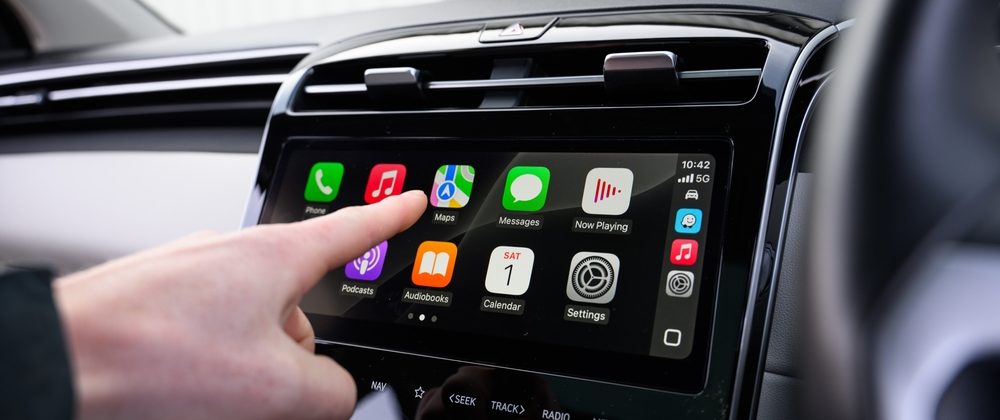
Modern driving is no longer limited to basic audio and navigation. Drivers today expect seamless smartphone integration, real-time navigation, hands-free communication, and easy access to entertainment. This is why CarPlay installation Hayward has become one of the most requested upgrades for drivers looking to modernize their vehicles and improve their overall driving experience.
Whether you drive a newer car with limited infotainment features or an older vehicle that lacks modern connectivity, installing Apple CarPlay can significantly enhance convenience, safety, and usability. This guide explains everything you need to know about Apple CarPlay installation, including compatibility, installation process, features, and how to choose the right setup for your vehicle.
What Is Apple CarPlay and Android Auto
Apple CarPlay and Android Auto are smartphone integration systems that allow drivers to connect their devices directly to their vehicle’s infotainment system.
Apple CarPlay is designed for iPhone users and provides access to:
- Navigation apps like Apple Maps and Google Maps
- Phone calls and messaging
- Music streaming services
- Voice commands through Siri
Android Auto offers similar functionality for Android users, using Google Assistant and Google services.
If you want a deeper comparison between both systems, you can explore Apple CarPlay vs Android Auto systems explained for Bay Area drivers, which helps you understand which platform suits your needs better.
Why Drivers in Hayward Are Upgrading to Apple CarPlay
Driving in the Bay Area often involves heavy traffic, long commutes, and frequent navigation changes. Apple CarPlay simplifies the experience by providing a safer, more intuitive interface.
Drivers in Hayward choose CarPlay because it allows them to:
- Access navigation without handling their phone
- Respond to messages using voice commands
- Stream music without distraction
- Stay connected while focusing on the road
This upgrade is especially valuable for daily commuters, rideshare drivers, and anyone who spends significant time on the road.
Can You Install Apple CarPlay in Older Cars
One of the most common questions drivers ask is whether Apple CarPlay can be installed in older vehicles. The answer is yes in most cases.
Older vehicles without built-in infotainment systems can be upgraded with aftermarket head units that support Apple CarPlay. These systems can add modern functionality without requiring a new vehicle.
Many drivers combine this upgrade with broader improvements discussed in audio upgrades for older cars in Hayward, which explains how to modernize older vehicles effectively.
Wired vs Wireless Apple CarPlay Installation
When choosing an Apple CarPlay installation, one key decision is whether to use a wired or wireless system.
Wired CarPlay
Wired CarPlay connects your phone using a cable. It offers:
- Stable connection
- Consistent performance
- Simultaneous charging
Wireless CarPlay
Wireless CarPlay connects automatically when you enter the vehicle. It offers:
- Convenience without cables
- Clean interior setup
- Seamless connectivity
However, wireless systems may consume more battery and occasionally experience slight delays, depending on the environment.
Choosing between wired and wireless depends on your driving habits and preference for convenience versus stability.
Vehicle Compatibility and Factory Integration
Vehicle compatibility is one of the most important aspects of Apple CarPlay installation.
Not all vehicles are designed the same, and installation depends on the following:
- dashboard size and layout
- factory infotainment system
- existing wiring and electronics
- steering wheel controls
Many modern vehicles use complex electronic systems that require careful integration to maintain functionality.
Understanding the difference between integration and replacement is essential. You can learn more about this in factory integration vs full system replacement, which explains how different installation approaches affect performance and features.
What Features Can Be Retained After Installation
One of the biggest concerns for drivers is whether they will lose factory features after installing Apple CarPlay.
With proper installation, many features can be retained, including:
- Steering wheel controls
- Factory backup cameras
- Parking sensors
- Factory amplifiers
Professional installation ensures these features continue to function and adds new functionality.
What Happens During Professional Apple CarPlay Installation
Understanding the installation process helps build confidence and ensures you know what to expect.
A typical installation involves:
- Evaluating the vehicle’s compatibility and system requirements
- Selecting the appropriate head unit and components
- Removing the factory system safely
- Installing new components with proper wiring and integration
- Testing all features including CarPlay functionality and audio performance
The importance of proper installation is highlighted in importance of professional installation for modern electronics, which explains why expert installation leads to better performance and reliability.
How Apple CarPlay Improves Your Driving Experience
Apple CarPlay enhances both convenience and safety.
Key benefits include the following:
- Hands-free operation using voice commands
- Real-time navigation with traffic updates
- Easy access to music and apps
- Reduced distractions
To explore these benefits in detail, you can read the benefits of installing Apple CarPlay in your vehicle.
Integrating Apple CarPlay With Other Vehicle Features
Apple CarPlay works best when integrated with other vehicle systems.
Backup Camera Integration
Many CarPlay systems support backup cameras, providing a clear rear view when reversing. If you are considering adding this feature, you can explore backup camera installation for safer driving.
Audio System Integration
CarPlay can also be combined with upgraded audio systems for better sound quality. This is especially useful for drivers who want a complete infotainment upgrade.
Voice Control Integration
Voice control allows drivers to operate navigation, calls, and music without taking their hands off the wheel. Learn more about this in ice-controlled audio systems for smarter driving.
Common Mistakes to Avoid During Apple CarPlay Installation
Many installation issues can be avoided with proper planning.
Common mistakes include:
- Choosing incompatible systems
- Ignoring vehicle-specific requirements
- Poor wiring practices
- Skipping professional installation
Avoiding these mistakes ensures better performance and long-term reliability.
Cost of Apple CarPlay Installation in Hayward
The cost of installation varies depending on several factors:
- Type of head unit
- Vehicle compatibility
- Additional features such as a backup camera or DSP tuning
- Complexity of installation
While basic installations may be more affordable, advanced systems with integration features may require a higher investment.
Is Apple CarPlay Installation Worth It
For most drivers, Apple CarPlay installation is a worthwhile upgrade.
It improves:
- Driving convenience
- Safety through hands-free operation
- Vehicle functionality
- Overall driving experience
For older vehicles, it can bring modern features that were previously unavailable.
Who Should Consider Apple CarPlay Installation
Apple CarPlay is ideal for:
- Daily commuters
- RideShare drivers
- Drivers with older vehicles
- Anyone looking to improve connectivity and usability
If you rely heavily on navigation, communication, and music while driving, this upgrade can make a significant difference.
Future of Smart Car Infotainment Systems
Infotainment systems continue to evolve with new technology.
Future developments include:
- enhanced voice assistants
- wireless ecosystems
- larger and more responsive displays
- deeper integration with vehicle systems
Apple CarPlay is part of this evolution, helping bridge the gap between smartphones and vehicles.
Frequently Asked Questions
Can Apple CarPlay be installed in any car?
Most vehicles can support CarPlay with the right hardware and installation approach.
Is wireless CarPlay better than wired?
Wireless offers convenience, while wired provides more stable performance.
How long does installation take?
Most installations can be completed within a few hours, depending on complexity.
Can I keep my factory controls?
Yes, professional installation allows retention of steering wheel controls and other features.
Can I add a backup camera with CarPlay?
Yes, many systems support backup camera integration.
Final Thoughts
Apple CarPlay installation is one of the most practical upgrades for modern drivers. It enhances safety, improves connectivity, and makes everyday driving more enjoyable.
For drivers in Hayward, choosing the right system and ensuring professional installation can significantly improve performance and long-term reliability. Whether you are upgrading an older vehicle or enhancing a newer one, Apple CarPlay offers a smart, effective way to modernize your driving experience.
For the latest car upgrades, installation insights, and real project highlights, follow us on Facebook and Instagram.
David Trinh